




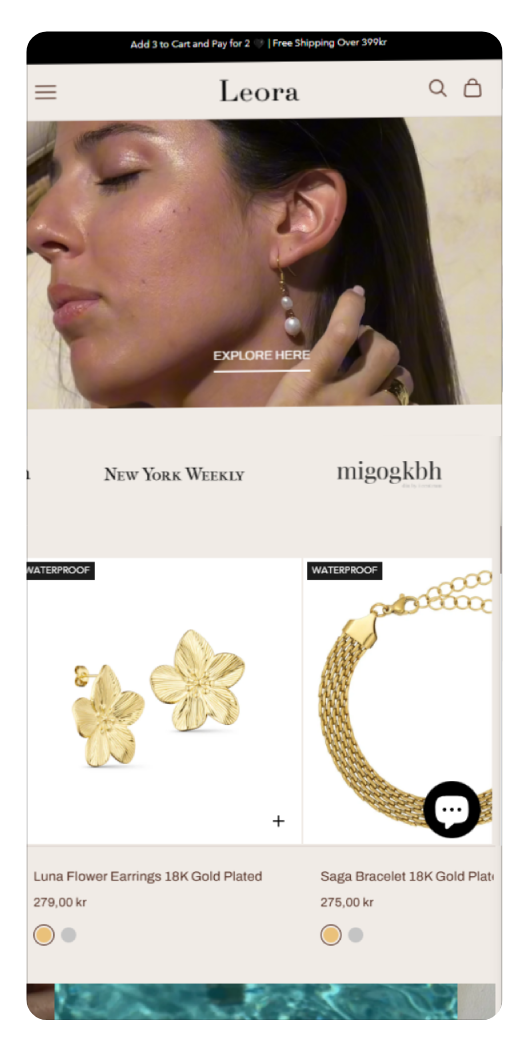





Best Shopify UX Design Practices to Boost Conversions in 2026
Creating a successful Shopify store isn’t just about great products—it’s about delivering a seamless, engaging user experience (UX). A well-designed UX can dramatically improve customer satisfaction, reduce bounce rates, and increase conversions.
In this guide, we’ll explore the best Shopify UX design practices to help you build a high-performing eCommerce store in 2026.
Why UX Design Matters for Shopify Stores
User experience directly impacts how customers interact with your store. A poor UX can lead to cart abandonment, while a smooth experience encourages users to complete purchases.
Key benefits of good UX:
● Higher conversion rates
● Improved customer retention
● Better SEO rankings
● Increased average order value
1. Optimize for Mobile-First Experience
More than half of eCommerce traffic comes from mobile devices. Shopify themes are responsive, but optimization is still essential.
Best practices:
● Use mobile-friendly themes
● Keep navigation simple
● Optimize button sizes for touch
● Avoid cluttered layouts
👉 Tip: Test your store on multiple screen sizes to ensure consistency.
2. Improve Site Speed and Performance
A slow-loading website frustrates users and hurts conversions.
How to improve speed:
● Compress images
● Use lazy loading
● Minimize apps and scripts
● Choose a lightweight theme
👉 A delay of even 1 second can reduce conversions significantly.
3. Simplify Navigation
Clear navigation helps users find what they need quickly.
Best practices:
● Use a simple menu structure
● Limit categories to essential items
● Add a search bar with auto-suggestions
● Use breadcrumbs for easy navigation
👉 Keep your menu intuitive and user-focused.
4. Create High-Converting Product Pages
Your product page is where decisions happen.
Key elements:
● High-quality images and videos
● Clear product descriptions
● Bullet-point features
● Customer reviews and ratings
● Strong call-to-action (CTA)
👉 Use urgency triggers like “Limited Stock” or “Only 3 left”.
5. Streamline the Checkout Process
A complicated checkout is one of the biggest reasons for cart abandonment.
Optimization tips:
● Enable guest checkout
● Reduce form fields
● Offer multiple payment options
● Show progress indicators
👉 Shopify’s one-page checkout can significantly improve conversions.
6. Use Trust Signals
Customers need reassurance before making a purchase.
Add:
● SSL certificates
● Trust badges
● Customer reviews
● Clear return and refund policies
👉 Trust signals reduce hesitation and increase credibility.
7. Focus on Visual Hierarchy
Guide users’ attention using design elements.
How to do it:
● Use contrasting colors for CTAs
● Highlight key information
● Use whitespace effectively
● Keep typography clean and readable
👉 Make it easy for users to scan your pages.
8. Personalize User Experience
Personalization improves engagement and sales.
Examples:
● Product recommendations
● Recently viewed items
● Location-based offers
● Personalized emails
👉 Tailored experiences increase conversion rates.
9. Optimize Search Functionality
Many users rely on search instead of browsing.
Enhancements:
● Auto-complete suggestions
● Filters and sorting options
● Error tolerance (typos)
● Relevant product results
👉 A powerful search feature improves user satisfaction.
10. Use Clear Call-to-Actions (CTAs)
Your CTA should guide users toward action.
Best practices:
● Use action-driven text (e.g., “Buy Now”, “Add to Cart”)
● Make buttons prominent
● Use contrasting colors
● Place CTAs strategically
👉 Avoid vague or hidden buttons.
11. Reduce Cognitive Load
Too much information can overwhelm users.
Simplify by:
● Breaking content into sections
● Using icons and visuals
● Keeping text concise
● Removing unnecessary elements
👉 Simplicity improves usability.
12. Test and Improve Continuously
UX is not a one-time task.
Use:
● A/B testing
● Heatmaps
● Analytics tools
● User feedback
👉 Continuous optimization leads to long-term success.
Final Thoughts
A great Shopify UX design is the foundation of a successful online store. By focusing on usability, speed, and customer needs, you can create an experience that not only attracts visitors but converts them into loyal customers.
Implement these best practices to stay ahead in the competitive eCommerce landscape and maximize your Shopify store’s performance.

